
HP ProLiant DL145 Generation 3 Server Software Configuration Guide



System BIOS configuration 8
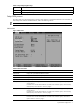
Table 2 Main menu fields
Field Description
System Memory Displays the amount of conventional memory detected during POST.
Extended Memory Displays the amount of extended memory detected during POST.
NOTE: If you install additional memory, the system automatically adjusts the System Memory and Extended Memory fields
to reflect the new memory size.
Set System Asset Text Enter the server asset tag.
System Serial Number Enter the server serial number. The serial number is indicated on the serial number label pull tab
on the front panel.
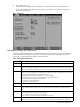
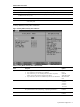
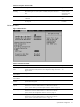
Primary Master/Primary Slave submenus
Figure 3 Primary Master/Primary Slave submenus
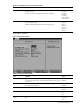
Table 3 Primary Master/Primary Slave submenus fields
Field Description Options
Type Selects the type of drive connected to the related port.
• If you select None, the related port is disabled.
• If you select User, you can manually enter the number of cylinders,
heads, sectors, and maximum capacity for the device.
• If you select Auto, the device is enabled to provide its own information.
Auto
None
CD-ROM
ATAPI Removable
IDE Removable
User
Multi-Sector Transfers Determines the number of sectors transferred per block. Disabled
2 Sectors
4 Sectors
8 Sectors
16 Sectors
LBA Mode Control Enables the use of the Logical Block Addressing (LBA) scheme, as opposed to
the Cylinders-Heads-Sectors (CHS) design, in specifying data blocks.
Disabled
Enabled
32 Bit I/O Enables 32-bit communication between the processor and the related device. Disabled
Enabled