
HP ProLiant DL145 Generation 3 Server Software Configuration Guide




System BIOS configuration 30
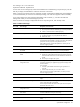
Table 18 POST Beep Codes
Code Beep Description
8Bh Test and initialize PS/2 mouse
8Ch Initialize floppy controller
8Eh Autotype hard drive size
8Fh Determine number of ATA drives (optional)
90h Initialize hard disk controllers
91h Initialize local bus hard disk controllers
92h Jump to user patch 2
93h Build MP table for multiprocessor boards
95h Install CD-ROM for boot
96h Clear huge ES segment register
97h Fix up MP table
98h 1-2 Search for option ROMs. One long, two short beeps on checksum failure
99h Check for SMART drive (optional)
9Ah Shadow option ROMs
9Bh Power management processor speed
9Ch Set up power management
9Dh Initialize security engine (optional)
9Eh Enable hardware interrupts
9Fh Determine number of SATA or SAS drives
A0h Set time of day
A2h Check key lock
A4h Initialize typematic rate
A8h Erase F10 prompt
AAh Scan for F10 key stroke
ACh Enter Setup
AEh Clear boot flag
B0h Check for errors
B1h Inform ROM pilot about the end of POST
B2h POST done, prepare to boot operating system
B3h Store extended CMOS
B4h 1 One short beep before boot
B5h Terminate quiet boot (optional)
B6h Check password (optional)
B7h Initialize ACPI BIOS
B9h Prepare boot
BAh Initialize SMBIOS
BBh Initialize PnP option ROMs
BCh Clear parity checkers
BDh Display Multi-boot menu
BEh Clear screen (optional)
BFh Check virus and backup reminders