
HP ProLiant DL145 Generation 3 Server Software Configuration Guide




System BIOS configuration 22
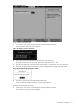
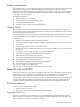
Figure 21 Changing a supervisor password
2. Type the original password in the Enter Current Password box, then press Enter.
3. Type a new password in the Enter New Password box, then press Enter.
4. Type the new password again in the Confirm New Password box, then press Enter.
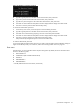
5. Press Enter to continue after the Setup Notice window displays that the changes have been saved.
6. Press F10 to save the password and close the Setup Utility.
To remove the administrator password:
1. In the Security menu screen, in the Set Supervisor Password field, press Enter.
2. Type the original password in the Enter Current Password box, then press Enter.
3. Press Enter twice without entering anything in the new and confirm password fields.
4. Press Enter to continue after the Setup Notice window displays that the changes have been saved.
5. Press F10 to save the changes you made and close the Setup Utility.
Setup automatically changes the Supervisor Password Is field to Clear.
To reset the administrator password:
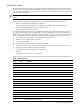
If you have forgotten the administrator password, you need to clear the CMOS and reset the BIOS settings to
regain access the Setup Utility. For instructions, refer to the “Clearing CMOS” section on page 25.
Boot menu
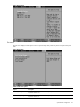
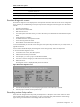
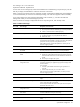
With this menu, you can set the boot search sequence during POST. By default, the server searches for boot
devices in the following order:
1. Removable device
2. CD-ROM drive (IDE and USB CD-ROM drives)
3. Hard drive
4. Embedded NIC1*
5. Embedded NIC2*
* Via PXE (Preboot Execution Environment, remote boot)