
HP ProLiant DL145 Generation 3 Server Software Configuration Guide




System BIOS configuration 21
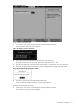
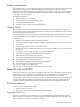
Figure 18 Security menu
To set an administrator password:
1. In the Security menu screen, in the Set Supervisor Password field, press Enter.
The Set Supervisor Password window displays.
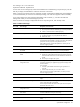
Figure 19 Setting a supervisor password
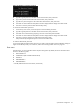
2. Type a new password in the Enter New Password box, then press Enter.
The password may consist of up to eight alphanumeric characters (A-Z, a-z, 0-9).
3. Type the same password in the Confirm New Password box to verify the first entry, then press Enter.
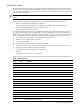
4. Press Enter to continue after the Setup Notice window displays that the changes have been saved.
Figure 20 Saved password confirmation window
5. Press F10 to save the password and close the Setup Utility.
Setup automatically changes the Supervisor Password Is field to Set.
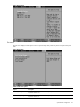
To change the administrator password:
1. In the Security menu screen, in the Set Supervisor Password field, press Enter.
The Set Supervisor Password window displays.