
HP ProLiant DL145 Generation 3 Server Software Configuration Guide




System BIOS configuration 10
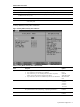
Table 4 Boot Options submenu fields
Field Description Options
Error Message
Handling
Enables a length of time for the system to stop booting and wait for user input
after detecting an error. If this option is disabled, the system continues to
boot.
Disabled
Wait 5 seconds
Wait 30 seconds
Wait Forever
Halt On Error Enables the system to stop POST and wait for user input when a POST error
is detected.
No
Yes
After Power Failure Selects whether the system returns to an off state or its last state following a
loss of power.
Stay Off
Last State
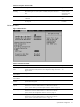
Advanced menu
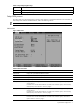
Figure 5 Advanced menu
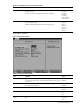
Table 5 Advanced menu fields
Field Description Options
Reset Configuration
Data
Selects whether to erase data in the section of memory for ESCD (Extended
System Configuration Data) that stores the configuration settings for non-PnP
plug-in devices.
No
Yes
Embedded NIC 1
MAC Address
Displays the Media Access Control (MAC) address for the LAN port 1.
Embedded NIC 2
MAC Address
Displays the MAC address for the LAN port 2.
Dedicated NIC MAC
Address
Displays the MAC address for the management processor dedicated LAN
port for IPMI management.
Memory Controller
Options
Displays the settings related to the system memory.
Press Enter to access the related submenu. For details on the submenu
options, see the “Memory Controller Options submenu” section on page 11.
PCI Configuration Displays the settings related to the expansion slots and Ethernet chipset.
Press Enter to access the related submenu. For details on the submenu
options, see the “PCI Configuration submenu” section on page 12.
Serial ATA Displays the settings related to the embedded serial ATA controller.
Press Enter to access the related submenu. For details on the submenu
options, see the “Serial ATA submenu section on page 14”.