
HP ProLiant DL140 Server Maintenance and Service Guide

HP ProLiant DL140 Server Maintenance and Service Guide 41
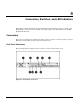
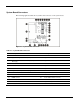
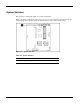
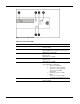
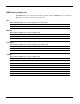
Figure 4-5: Front panel LEDs
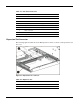
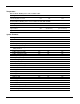
Table 4-6: Front Panel LEDs
Item LED Description Status
1 Optical CD-ROM drive activity On = Activity
Off = No activity
2 Power On/Off Button
Green = System has AC power and is turned on.
Off = Standby mode or System is not powered on.
Blinking Green = Hibernate.
3 NIC 2 link/activity
On (Green) = Link
Off = No Link
Blinking Green = Activity
4 NIC 1 link/activity
On (Green) = Link
Off = No Link
Blinking Green = Activity
5 Server Status
Off = Good
Red = Critical Error as following:
• At least one fan failure
• At least one processor failure
• At least one of the temperature
sensors reached critical
temperature
• At least one processor VRM
failure
• At least one memory module
exceeds the max single bit error rate
6 Hard drive activity
Blinking Green = Activity
Off = No Activity