
HP ProLiant DL140 Server Maintenance and Service Guide

HP ProLiant DL140 Server Maintenance and Service Guide 33
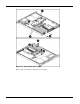
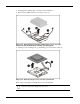
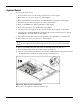
4. Disengage the retaining clips on each side of the heatsink (1).
5. Remove the heatsink from the top of the processor (2).
Figure 2-23: Disengaging the heatsink retaining clips (one on each side)
and removing the heatsink (both retaining clips disengaged)
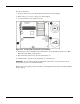
6. Lift the processor locking lever (1) and lift the processor from the socket (2).
Figure 2-24: Removing the processor from the system board
Reverse steps 1 through 6 to reinstall the processor and heatsink.
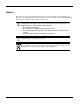
CAUTION: Always use a new heatsink when replacing processors. Failure to use new
components may result in damage to the processor.