
HP ProLiant DL140 Server Maintenance and Service Guide

HP ProLiant DL140 Server Maintenance and Service Guide 31
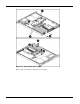
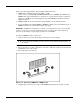
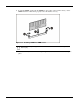
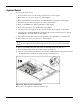
6. To install a DIMM, gently push the DIMM into the socket on the system board (1). As the
DIMM enters the socket and is properly seated, the latches close (2).
Figure 2-21: Installing a DIMM in a DIMM socket
CAUTION: Use only HP supplied DIMMs. DIMMs from other sources can adversely affect
data integrity.
7. Press down firmly on the DIMM while pushing the latches inward until the latches snap into
place.