
HP ProLiant DL140 Server Maintenance and Service Guide

HP ProLiant DL140 Server Maintenance and Service Guide 30
Observe the following guidelines when installing additional memory:
• DIMMs must be industry-standard, 512-MB, or 1-GB,
3-cm (1.2-in), 184-pin PC2100, 266-MHz DDR ECC memory DIMMs. The DDR memory
DIMMs must support CAS Latency 2, where CL=2 or greater. They must also contain the
mandatory Joint Electronic Device Engineering Council (JEDEC) Serial Presence Detect
(SPD) information.
• DIMMs installed in the server must be registered DDR, 2.5 volts and 64-bits wide.
• Do not mix ECC and non-ECC DIMMs or DIMMs of different speeds. If different types of
DIMMs are mixed, the system will not function properly.
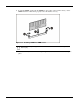
IMPORTANT: A DIMM can be installed only one way. Be sure to match the key slots on the module with
the tabs on the memory slot. Push the module down into the slot until it is fully inserted and properly
seated. The system will not recognize improperly aligned or seated DIMMs.
To replace a DIMM from the system board:
1. Power down the server. See “Powering Down the Server” in this chapter.
CAUTION: ESD can damage electronic components. Ensure that you are properly grounded
before beginning any installation procedure. Refer to “Electrostatic Discharge Information” in
this chapter.
2. Remove the top cover. See “Top Cover” in this chapter.
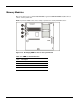
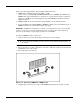
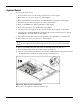
3. Press both memory module socket latches outward (1). This action releases the module and
partially lifts it out of the socket.
4. Lift out the memory module (2).
Figure 2-20: Removing a DIMM from a DIMM socket
5. Align the key slot in the bottom edge of the DIMM with the tab in the expansion socket.