
HP ProLiant DL140 Server Maintenance and Service Guide

HP ProLiant DL140 Server Maintenance and Service Guide 28
To remove the battery:
1. Power down the server. See “Powering Down the Server” in this chapter.
2. Remove the top cover. See “Top Cover” in this chapter.
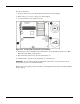
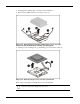
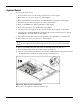
3. Locate the battery on the system board (1).
Figure 2-18: Locating and removing the system battery
4. If necessary, remove the PCI riser board assembly to access the battery location. See “PCI
Riser Board Assembly” in this chapter.
5. Press the battery release lever away from the battery (2).
6. Lift the battery on the lever side and pull it out of the holder (3).
IMPORTANT: Do not bend the retaining clip during battery replacement. For proper operation, the clip
must maintain a position of contact with the battery.
Reverse steps 1 through 6 to replace the battery, ensuring that the new battery is installed with the
positive side up.