
HP ProLiant DL140 Server Maintenance and Service Guide

HP ProLiant DL140 Server Maintenance and Service Guide 23
Optical CD-ROM Drive Assembly Cable
To remove the optical CD-ROM drive assembly cable:
1. Power down the server. See “Powering Down the Server” in this chapter.
2. Remove the top cover. See “Top Cover” in this chapter.
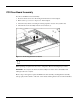
3. Remove the PCI riser board assembly. See “PCI Riser Board Assembly” in this chapter.
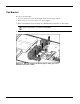
4. Remove the fan bracket. See “Fan Bracket” in this chapter.
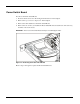
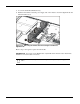
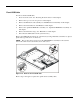
5. Disconnect the optical CD-ROM drive assembly cable from the optical device assembly
backplane (1).
6. Disconnect the optical CD-ROM drive assembly cable from the system board (2).
Figure 2-15: Disconnecting the optical device assembly cable
Reverse steps 1 through 6 to replace the optical device assembly cable.