
HP ProLiant DL140 Server Maintenance and Service Guide

HP ProLiant DL140 Server Maintenance and Service Guide 22
Cables
The following sections of this guide contain removal and replacement procedures for the standard
cables that ship with the server:
• ATA/100 cables
• Optical CD-Rom Drive Assembly cable.
• Front USB cables.
ATA Hard Drive Cables
To remove the ATA cables:
1. Power down the server. See “Powering Down the Server” in this chapter.
2. Remove the top cover. See “Top Cover” in this chapter.
3. Remove the PCI riser board assembly. See “PCI Riser Board Assembly” in this chapter.
4. Remove the fan bracket. See “Fan Bracket” in this chapter.
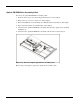
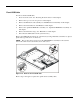
5. Disconnect the ATA hard drive cable from the primary ATA controller (1) and hard drive
connector (2, 3).
Figure 2-14: Disconnecting the ATA cables
Reverse steps 1 through 5 to replace the ATA cables.