
HP ProLiant DL140 Server Maintenance and Service Guide

HP ProLiant DL140 Server Maintenance and Service Guide 20
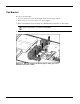
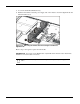
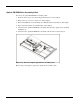
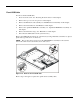
5. Loosen the fan bracket thumbscrew (1).
6. Push the fan bracket toward the power supply side of the chassis to clear the alignment tab and
lift fan bracket out (2).
Figure 2-12: Unlocking the fan bracket and clearing the fan bracket
alignment tab
Reverse steps 1 through 6 to replace the fan bracket.
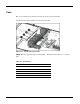
IMPORTANT: See Server Access Panel Label or System Board Connecter section later in this
manual for correct fan cable connections.
CAUTION: When installing fan bracket assembly, avoid damage to the power supply and fan
cables