
HP ProLiant DL140 Server Maintenance and Service Guide

HP ProLiant DL140 Server Maintenance and Service Guide 19
Fan Bracket
To remove the fan bracket:
1. Power down the server. See “Powering Down the Server” in this chapter.
2. Remove the top cover. See “Top Cover” in this chapter.
3. Remove the PCI riser board assembly. See “PCI Riser Board Assembly” in this chapter.
WARNING: To reduce the risk of personal injury from hot surfaces, allow the internal
system components to cool before touching them.
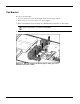
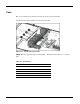
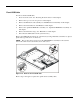
4. Disconnect the fan bracket fan cables (1~5) from the fan connectors on the system board.
Figure 2-11: Disconnecting the fan bracket power cables (processor
heatsinks removed for clarity)