
HP ProLiant DL140 Server Maintenance and Service Guide

HP ProLiant DL140 Server Maintenance and Service Guide 18
Expansion Board
To remove an expansion board:
CAUTION: To avoid the risk of damage to the system or expansion boards, remove all power
cords before installing or removing an expansion board. When the front panel power switch is
off, auxiliary power is still connected to the PCI expansion slot and may damage the card.
1. Power down the server. See “Powering Down the Server” in this chapter.
2. Remove the top cover. See “Top Cover” in this chapter.
3. Disconnect all cables from the expansion board.
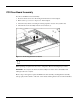
4. Remove the PCI riser board assembly. See “PCI Riser Board Assembly” in this chapter.
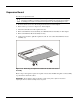
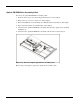
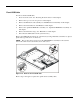
5. Remove the PCI riser Board assembly screw(1)
6. Apply even pressure to pull the expansion board out of its socket in the PCI riser board
assembly (2).
Figure 2-10: Removing an expansion board from the PCI riser board
assembly
Reverse steps 1 through 6 to replace an expansion board. Use the PCI card guide on the assembly
to position the board in the socket.
IMPORTANT: Ensure that the expansion board is seated securely in the expansion slot before
replacing the PCI riser board assembly and access panel.