
HP ProLiant DL140 Server Maintenance and Service Guide

HP ProLiant DL140 Server Maintenance and Service Guide 17
PCI Riser Board Assembly
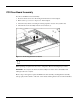
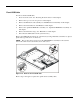
To remove the PCI riser board assembly:
1. Power down the server. See “Powering Down the Server” in this chapter.
2. Remove the top cover. See “Top Cover” in this chapter.
3. Disconnect any cables connecting an existing expansion board to the system board.
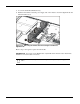
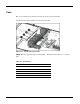
4. Lift and remove the assembly from the server chassis (1).
Figure 2-9: Removing the PCI riser board
CAUTION: When removing the PCI riser board assembly, avoid damage to the system cables
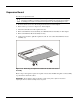
When replacing an expansion board, refer to “Expansion Board” following this procedure.
IMPORTANT: Do not replace the PCI riser board assembly in the chassis unless all installation and
cabling procedures are complete.
Reverse steps 1 through 5 to replace the PCI riser board assembly, ensuring that the assembly
seats properly in the retainers on the rear of the chassis and the guides located on the fan bracket.