
HP ProLiant DL140 Server Maintenance and Service Guide

HP ProLiant DL140 Server Maintenance and Service Guide 16
Power Switch Board
To remove the Power Switch Board:
1. Power down the server. See “Powering Down the Server” in this chapter.
2. Remove the top cover. See “Top Cover” in this chapter.
3. Remove the cable attached to the Power Switch Board.
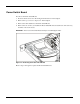
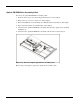
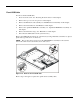
4. Remove the two screws (1) and slide the Power Switch Board toward the rear of the server (2)
and lift to remove the board.
IMPORTANT: Remove the Power Switch Board carefully to avoid damaging the LEDs.
Figure 2-8: Removing the Power Switch Board
Reverse steps 1 through 4 to replace the Power Switch Board.