
HP ProLiant DL140 Server Maintenance and Service Guide

HP ProLiant DL140 Server Maintenance and Service Guide 15
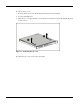
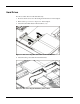
5. Remove the hard drive and hard drive tray:
a. Remove the screw that secures the hard drive tray to the chassis (1).
b. Slide the tray toward the rear of the server and lift the tray out of the chassis (2).
Figure 2-6: Removing the hard drive tray from the chassis
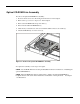
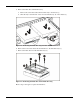
6. Remove the four screws that secure the hard drive to the hard drive tray (1).
7. Remove the hard drive from the hard drive tray (2).
Figure 2-7: Removing the hard drive from a hard drive tray
Reverse steps 1 through 7 to replace the hard drive.