
HP ProLiant DL140 Server Maintenance and Service Guide

HP ProLiant DL140 Server Maintenance and Service Guide 14
Hard Drives
To remove a hard drive from the hard drive bay:
1. Power down the server. See “Powering Down the Server” in this chapter.
2. Remove the top cover. See “Top Cover” in this chapter.
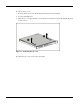
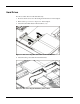
3. Disconnect the ATA cables from hard drives (1,2).
Figure 2-4: Disconnecting the cables from the ATA hard drives
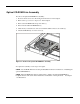
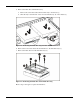
4. Disconnect the power cables from the hard drives.
Figure 2-5: Disconnecting the hard drive power cables