
HP ProLiant DL140 Server Maintenance and Service Guide

HP ProLiant DL140 Server Maintenance and Service Guide 12
Hard Drive Overview
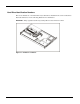
The server contains two drive bays for ATA hard drives. There are two ATA channels. One
channel is dedicated to the hard drives and the other to the CDROM. The server ships standard
with two 1-inch drive trays for use with two 1-inch ATA hard drives. The following sections
provide general guidelines and installation procedures for installing or upgrading hard drives.
Guidelines for Installing ATA Hard Drives
When installing ATA hard drives in the server, observe the following general guidelines:
• Populate hard drive bays starting with the lowest ATA device number. Device 0 serves as the
primary boot drive.
• Set the jumpers on both ATA drives to Cable-Select mode.
• Do not add more than two ATA drives in the HP ProLiant DL140 server.
IMPORTANT: ATA hard drives must be configured to the Cable-Select mode.
NOTE: ATA drives are set to Cable-Select mode by default.
NOTE: Refer to the documentation shipped with the hard drive to determine how to set the jumpers on
the ATA hard drives to Cable-Select mode, if they are not already set in Cable-Select mode.