
HP ProLiant DL140 Server Maintenance and Service Guide

HP ProLiant DL140 Server Maintenance and Service Guide 11
Optical CD-ROM Drive Assembly
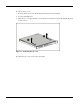
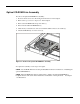
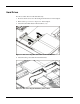
To remove the Optical CD-ROM drive assembly:
1. Power down the server. See “Powering Down the Server” in this chapter.
2. Remove the top cover. See “Top Cover” in this chapter.
3. Remove the CD-ROM cable and power cable (1).
4. Press in and hold the CD-ROM latch (2)
5. Slide the tray toward the rear of the server until the USB connectors are visible (3).
6. Lift the CD-ROM tray out of the server (4).
Figure 2-2: Remove the option CD-ROM drive assembly
To replace the assembly, reverse steps 1 through 6.
NOTE: See the HP ProLiant Server Setup and Installation Guide for instructions on installing the
optional CD-ROM drive.
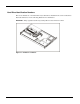
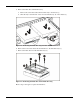
NOTE: If the CD-ROM drive must be replaced due to failure, the Optical CD-ROM Drive
backplane must be removed from the failed drive and installed on the replacement. See Chapter
1 for illustrations.