
HP ProLiant DL140 Server Maintenance and Service Guide

HP ProLiant DL140 Server Maintenance and Service Guide 9
Top Cover
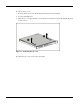
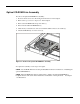
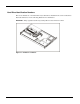
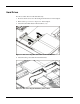
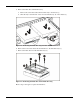
To access the system board, processor, memory modules, expansion slot, and other internal
components, remove the top cover. Observe the following warnings and cautions.
WARNING: The front panel Power On/Off switch does not completely shut off all system
power. Portions of the power supply and some internal circuitry remain active until AC
power is removed.
WARNING: To reduce the risk of personal injury from hot surfaces, allow the internal
system components to cool before touching them.
CAUTION: Before removing the server top cover, be sure that the server is powered down
and that the power cord is disconnected from the server or the electrical outlet.
CAUTION: To avoid the risk of damage to the system or expansion boards, remove all power
cords before installing or removing expansion boards. When the Power On/Off switch is in the
Off position, auxiliary power is still connected to the PCI expansion slot and may damage the
card.
CAUTION: Electrostatic discharge can damage electronic components. Ensure proper
grounding before beginning any installation procedure.