
HP ProLiant DL140 Server Maintenance and Service Guide

HP ProLiant DL140 Server Maintenance and Service Guide 8
Powering Down the Server
The server does not completely power down when the front panel power button is pressed. The
button toggles server power between On and Standby. In Standby, the server removes power from
most electronics and drives, portions of the power supply and some internal circuitry remain active.
To completely remove all power from the system, disconnect the power cord from the server.
WARNING: To reduce the risk of injury from electric shock, remove the power cord to
completely disconnect power from the system.
WARNING: To reduce the risk of personal injury or damage to the equipment, be sure
that only one component is extended at a time. A rack may become unstable if more
than one component is extended for any reason.
WARNING: Because the rack allows you to stack computer components in a vertical
rather than a horizontal plane, you must take precautions to provide for rack stability
and safety to protect both personnel and property. Heed all cautions and warnings
throughout the installation instructions that come with the server.
WARNING: To reduce the risk of personal injury or damage to the equipment, place the
server on a sturdy table or workbench whenever it is removed from the rack for device
accessibility. Refer to the HP ProLiant DL140 Server Setup and Installation Guide for
further information on working with racks.
CAUTION: Moving the Power On/Off switch to the Off position does not completely remove
system power. Some portions of the power supply and some internal circuitry remain active.
Disconnect all power cords from the server to remove all power from the system.
CAUTION: Electrostatic discharge (ESD) can damage electronic components. Be sure you
are properly grounded before beginning any installation procedure. For more information, see
“Electrostatic Discharge Information” in this chapter.
To power down the server:
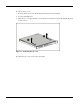
1. Press the power button to toggle the server to standby. The power LED on the power button
changes from green to off.
2. Listen for the fan noise to stop to indicate that the server is powered down.
3. Disconnect the power cord first from the AC outlet and then from the server.
4. Disconnect all remaining cables on the server rear panel, including cables extending from
external connectors on expansion boards.
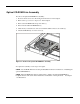
5. Remove the server from the rack and position it securely on a workbench or other solid
surface for stability and safety.