
HP ProLiant DL140 Generation 3 Server Maintenance and Service Guide

Contents 94
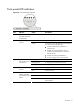
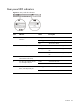
Rear panel LED indicators
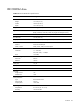
Figure 71 Rear panel LED indicators
Item Indicator Status Description
Solid green An active network link exists.
Flashing green An ongoing network data activity exists.
1 NIC activity/link status LED
indicators
Off The server is off-line.
Steady amber The LAN connection is using a GbE link.
Steady green The LAN connection is using a 100 Mbps
link.
2 NIC network speed LED indicators
Off The LAN connection is using a 10 Mbps
link.
3 UID LED indicator (recessed
underneath the UID button)
Blue A UID button has been pressed.
Green A network link exists. 4 Link status LED indicator for the
10/100 Mbps LAN port
Off No network link exists.
Flashing green Network activity exists.
5 Activity status LED indicator for
the10/100 Mbps LAN port
Off No network activity exists.