
HP ProLiant DL140 Generation 3 Server Maintenance and Service Guide

Contents 91
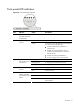
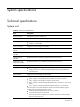
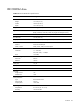
Front panel LED indicators
Figure 69 Front panel LED indicators
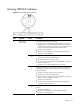
Item Indicator Status Description
1 UID LED indicator
(recessed underneath
the UID button)
Blue A UID button has been pressed.
Off System health is normal. 2 System health LED
indicator
Amber A pre-failure system threshold has been breached.
This may be any of the following:
• At least one fan failure (system fan or
processor fan)
• At least one of the temperature sensors
reached critical level (system or processor
thermal sensors)
• At least one memory module failure
• A power supply unit error has occurred.
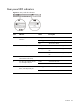
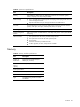
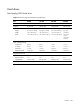
Solid green An active network link exists.
Flashing green An ongoing network data activity exists.
3 Activity/link status
LED indicators for NIC
1 and NIC 2
Off The server is off-line.
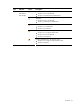
Flashing green Ongoing drive activity 4 HDD activity LED
indicator
Off No drive activity
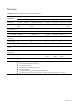
Green The server has AC power and is powered on.
Amber The server has AC power and is in standby mode.
5 Power status LED
indicator (recessed
underneath the power
button)
Off The server is powered off (AC power
disconnected).