
HP ProLiant DL140 Generation 3 Server Maintenance and Service Guide
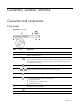
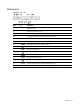
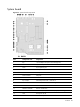
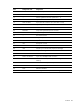

Contents 90
Hot-plug cable
If you are switching from a non-hot-plug SATA hard drive system to a hot-plug SATA/SAS one, you
will need to install the hot-plug cable. This cable supports both SATA and SAS functions. Go to page
41 for instructions on how to install this cable.
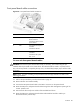
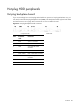
Figure 68 Hot-plug cable connectors
Item Connector Connects to
1 Hot-plug cable
board
connector
Hot-plug SATA/SAS
controller board
2 HDD 1 data
cable connector
SAS1/SATA1 on the
backplane board
3 HDD 2 data
cable connector
SAS2/SATA2 on the
backplane board
4 HDD LED cable
connector
CN6 on the backplane
board
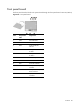
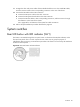
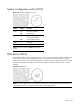
Status LED indicators
The status LED indicators aid in problem diagnosis by indicating the status of system components and
operations of the server.