
HP ProLiant DL140 Generation 3 Server Maintenance and Service Guide



Contents 88
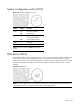
System configuration switch (SW2)
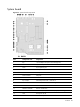
Figure 65 System configuration switch
Switch Status Function
SW2-1 On
Off
Boot block enabled
Normal boot
SW2-2 On
Off
Clear CMOS settings and
restore system defaults
Normal CMOS settings
SW2-3 — Reserved
SW2-4 — Reserved
NOTE: The status indicated in bold text is the default
setting.
NMI button (SW4)
If the system crashes or stops operating properly, you can use the NMI button (SW4) to mechanically
force the server to issue a non-maskable interrupt. This will perform a memory dump—writing the
contents of the server's CPU registers and RAM to a network server or to diskettes. This memory dump
can later be analyzed to determine the cause of the problem. By default, the NMI switch is always
enabled.
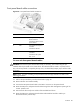
Figure 66 NMI button
NOTE: Use of the NMI button is not supported in all NOS. As of the present, NMI implementation is
not available for systems running on Solaris and Linux operating systems.