
HP ProLiant DL140 Generation 3 Server Maintenance and Service Guide

Contents 81
Connectors, switches, and LEDs
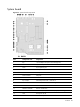
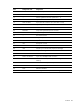
Connectors and components
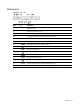
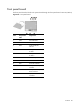
Front panel
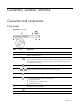
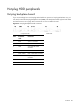
Figure 59 Front panel
Item Icon Component
1 Hard disk drive (HDD) bays
2 Optical media device bay
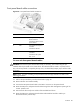
3
Front unit identification (UID) button with LED indicator (blue)
Press to illuminate the UID LED indicators on the front and rear panels. This is to mark
a particular unit within a server group for purpose of identification during servicing
or maintenance procedures.
4
System health LED indicator (amber)
5
Activity/link status LED indicators for NIC 1 and NIC 2 (green)
6
HDD activity LED indicator (green)
7
Power status LED indicator (bicolor: green/amber)
• Powers up the server.
• Places the server in standby mode.
• Powers down the server.
8 Thumbscrews for the front bezel
9
Front USB ports
10 Serial label pull tab