
HP ProLiant DL140 Generation 3 Server Maintenance and Service Guide




Contents 68
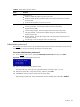
Table 5 Setup Utility's primary menus
Menu Function
Power Use this menu to:
• Enable or disable the modem ring power-up function.
• Enable or disable the WOL (Wake-On-LAN) function of the onboard LAN controllers
(U20 and U30)
• Set the mode of operation if a power loss occurs.
Exit Use this menu to select an exit option to quit from the Setup Utility. Options include:
• Exit Saving Changes - Saves changes made and close the Setup Utility.
Keyboard shortcut: F10
• Exit Discarding Changes - Discards changes made and close the Setup Utility.
• Load Setup Defaults - Loads the factory-default settings for all Setup parameters.
Keyboard shortcut: F9
• Discard Changes - Discards all changes made to the Setup Utility and loads previous
configuration settings.
• Save Changes - Saves all changes made to the Setup Utility.
Administrator password
The Security menu allows users to set an administrator password. When entered, this password will
allow the user to access and change all settings in the Setup Utility.
To set an administrator password:
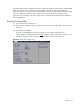
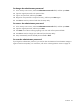
1. In the Security menu screen, select the Administrator Password Is field then press Enter.
Figure 58 Setting an administrator password
2. Type a new password in the password box.
The password may consist of up to eight alphanumeric characters (A-Z, a-z, 0-9).
3. Retype the password to verify the first entry, and then press Enter.
4. Press F10 to save the password and close the Setup Utility.
After setting the password, Setup automatically sets the selected password field to Enabled.