
HP ProLiant DL140 Generation 3 Server Maintenance and Service Guide




Contents 67
Setup Utility menus
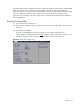
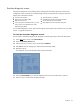
The Setup Utility provides a menu bar with the menu selections. The menu bar choices are described
in the.
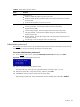
Table 5 Setup Utility's primary menus
Menu Function
Main Use this menu to:
• View BIOS information including ROM ID, version number and build date
• Set the system time and date.
• Configure drive settings for available IDE and SATA devices.
• Select which options to run during system boot-up.
• View the amount of available conventional and extended memory detected during
boot-up.
• Enter the server asset tag and serial number.
Advanced Use this menu to:
• Clear all configuration data in a section of memory for ESCD (Extended System
Configuration Data), which stores the configuration settings for non-PnP plug-in devices.
• View the MAC (Media Access Control) address of each of the three LAN ports.
• Select a memory branch mode and related setting.
• Enable
or disable support for PATA and SATA devices.
• Select which functions to enable for available USB devices.
• Configure the hardware settings for the processors, the onboard Ethernet controllers, the
expansion slots, and the serial port.
• Configure console redirection settings.
• Console redirection allows the system to be displayed on a remote terminal for online
server management.
• View the specification version for the IPMI and BMC firmware
• Configure LAN related-settings.
• View and/or clear the event log.
• View real-time system temperature and voltage data.
• Enable
or disable the hardware watchdog timer.
CAUTION: Be cautious in setting field values in this menu as any incorrect value may cause
the system to malfunction.
Security Use this menu to set an administrator password to prevent unauthorized access to the Setup
utility. Refer to the “Administrator password” section on the next page for more information
on using this menu.
Boot Use this menu to set the preferred drive sequence in which the Setup Utility attempts to boot
the operating system. Options for enabling the PXE function of the LAN ports are also
available.
By default, the server searches for boot devices in the following order:
1 CD-ROM drive (IDE and USB CD-ROM drives)
2 Removable device
3 Hard drive
4 Embedded NIC1*
5 Embedded NIC2*
* Via PXE (Preboot Execution Environment, remote boot)