
HP ProLiant DL140 Generation 3 Server Maintenance and Service Guide




Contents 64
PhoenixBIOS software
PhoenixBIOS software is a ROM BIOS-based diagnostic tool that monitors system activity and
performs constant hardware testing to ensure proper system operation. ROM BIOS is a set of
programs permanently stored in an EEPROM chipset (U64) located on the system board. These
programs micro-manage the hardware devices installed on your server.
The PhoenixBIOS software serves three functions:
• Configure the system settings via the PhoenixBIOS Setup Utility
Using the Setup program, you can install, configure, and optimize the embedded hardware
devices on your system (clock, memory, disk drives, etc.).
• Initialize hardware at boot via POST routines
At power-on or reset, the software performs POST routines to test system resources and load the
operating system.
• Perform run-time routines
Using the software, perform basic hardware routines that can be called from DOS and Windows
applications.
PhoenixBIOS Setup Utility
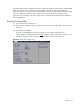
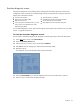
NOTE: NOTE: For ease of reading, PhoenixBIOS Setup Utility will be simply referred to as “Setup”
or “Setup Utility” in this guide. Also, the screenshots used in this guide display various Setup menu
screens with default values identified. These values may not be the same those in your server.
PhoenixBIOS Setup Utility is a hardware configuration program built into your system's Basic
Input/Output System (BIOS). Since most systems are already properly configured and optimized,
there is normally no need to run this utility.
You will need to run this utility under the following conditions:
• When changing the system configuration including:
○ Setting the system time and date
○ Configuring the hard drives
○ Specifying the boot device sequence
○ Installing PCI expansion boards
○ Upgrading the system BIOS
○ Configuring the power management modes
○ Setting up system passwords or making other changes to the security setup
• When a configuration error is detected by the system and you are prompted (“Run Setup”
message) to make changes to the BIOS settings.
NOTE: If you repeatedly receive “Run Setup” messages, the battery (BT1) located on the system
board may be defective. In this case, the system cannot retain configuration values in CMOS. Ask a
qualified technician for assistance.