
HP ProLiant DL140 Generation 3 Server Maintenance and Service Guide

Contents 55
To install the PCI-X riser board:
Installing the PCI-X riser board option allows users to install PCI-X compatible expansion boards in the
ProLiant server.
NOTE: For ease of reading, the PCI riser board assembly will simply be referred to as “assembly” in
the succeeding sections. Furthermore, in some figures, the plane section of the PCI riser board
assembly is dimmed out for clarity.
1. Remove the PCI riser board assembly following the procedures described in the previous section.
2. If an expansion board is currently installed on the PCI Express riser board(s), remove it.
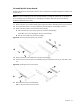
3. Remove the PCI Express riser board from the assembly.
a. Remove the three screws securing the riser board to the assembly.
Keep these screws for installing the PCI-X riser board later.
b. Pull the riser board away from the assembly.
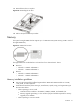
Figure 43 Removing the PCI Express riser boards
4. Remove the PCI-X riser board from its protective packaging.
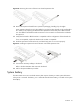
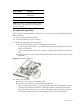
5. Secure the PCI-X riser board to the assembly using two of the three screws you removed in step
3-a.
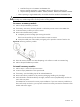
Figure 44 Installing the PCI-X riser boards
6. Reinstall the PCI riser board assembly.
Refer to the next section for instructions.