
HP ProLiant DL140 Generation 3 Server Maintenance and Service Guide

Contents 51
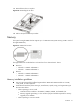
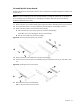
3. Reinstall the air duct in its place.
Figure 36 Reinstalling the air duct
4. Perform the post-installation procedure.
Memory
The system has eight DIMM slots that support up to 16 GB maximum system memory (2 GB in each of
the eight DIMM slots).
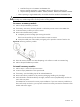
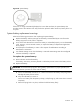
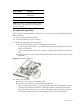
Figure 37 DIMM slots location
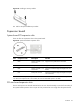
The eight DIMM slots are divided into two branches of two channels each. That is:
• Branch 0
○ Channel 0 – DIMM1 and DIMM 2
○ Channel 1 – DIMM3 and DIMM 4
• Branch 1
○ Channel 0 – DIMM5 and DIMM 6
○ Channel 1 – DIMM7 and DIMM 8
Memory installation guidelines
• Use only HP supported fully buffered registered ECC DDR2 667 DRAM modules in 512 MB,
1 GB, 2 GB, or 4 GB capacities.
• Install identical modules (of the same type, manufacturer, speed, timing, and organization) per
the instructions below.
○ When operating in mirror mode:
− Install the first four modules in the DIMM1, DIMM3, DIMM5, and DIMM7 slots.
− Memory upgrade granularity (i.e. the number of physical modules required for memory
upgrade) is four DIMMs.
○ When operating in non-mirror mode: