
HP ProLiant DL140 Generation 3 Server Maintenance and Service Guide

Contents 45
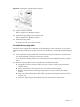
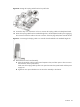
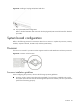
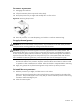
Figure 25 Installing a hot-plug SATA/SAS hard drive
3. Set up the SATA/SAS configuration.
Refer to the documentation that came with the hot-plug SATA/SAS controller board for detailed
procedure.
System board configuration
Refer to the following sections for instructions about how to remove or replace the processor, memory
modules, expansion boards, the IPMI card, and the system battery.
Processor
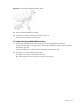
The server’s two LGA771 processor sockets support Dual-Core and Quad-Core Intel Xeon processors.
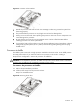
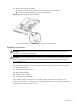
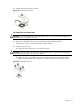
Figure 26 Processor socket location
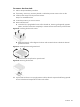
Processor installation guidelines
When configuring the processor, observe the following important guidelines:
• Processor socket 1 (CPU1) must always be populated. If no processor is installed in this socket,
the system will fail to boot and will halt during POST (Power-On Self-Test). This error prevents the
system from functioning properly.