
HP ProLiant DL140 Generation 3 Server Maintenance and Service Guide

Contents 44
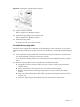
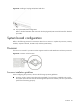
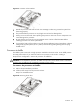
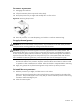
Figure 24 Connecting the backplane board cables
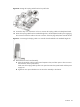
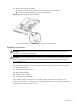
8. Perform the post-installation procedure.
9. Install the new hot-plug SATA/SAS hard drive to the unit.
Proceed to the next section for instructions.
To install a hot-plug SATA/SAS hard drive:
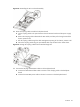
1. Select which drive bay you will use to install the new hot-plug SATA/SAS hard drive.
If the desired drive bay is occupied, remove the currently installed drive following the procedure
described in page 38.
If the desired drive bay is empty, slide the blank HDD carrier from the bay.
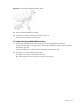
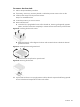
2. Install the new hot-plug SATA/SAS hard drive.
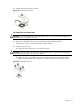
a. Slide the new drive into the selected drive bay.
b. Close the ejector lever to secure the new drive in the chassis.