
HP ProLiant DL140 Generation 3 Server Maintenance and Service Guide

Contents 43
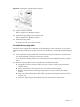
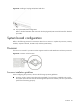
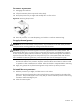
Figure 22 Reinstalling the PCI riser board assembly
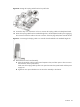
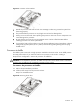
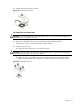
6. Route the hot-plug cable towards the backplane board.
a. Lay the hot-plug cable in the space between the PCI retainer bracket and the power supply
unit.
b. Position the hot-plug cable underneath the PSU cables, and then pull it through towards the
chassis’ partition wall.
c. Pull the hot-plug cable through the cable management opening of the chassis’ partition wall.
d. Secure the hot-plug cable using the pre-installed cable clips located on the chassis base.
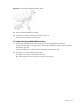
Figure 23 Routing the hot-plug cable from the standard height slot
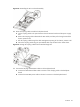
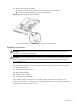
7. Connect the hot-plug and PSU HDD cables to the backplane board.
a. Connect the HDD LED and data cable connectors of the hot-plug cable to the backplane
board.
b. Connect the PSU HDD power cable to the CN7 connector on the backplane board.