
HP ProLiant DL140 Generation 3 Server Maintenance and Service Guide


Contents 37
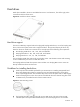
• If you removed a hard drive without plans of installing a new one, you must reinstall the
mounting screws to the blank HDD carrier, and then reinstall the carrier in the chassis for proper
cooling of the system.
Removing a hard drive
To remove a non-hot-plug SATA hard drive:
1. Perform the pre-installation procedure.
2. Remove the non-hot-plug SATA hard drive from the chassis.
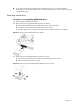
a. Disconnect the data and power cables from the rear of the hard drive.
b. Loosen the screw that secures the HDD carrier to the chassis.
c. Push the HDD carrier towards the front of the chassis, and then slide it out completely.
Figure 12 Removing the hard drive from the chassis
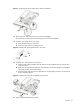
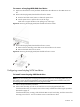
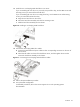
3. Remove the non-hot-plug SATA hard drive from its carrier.
a. Remove the four mounting screws that secure the hard drive to the carrier.
b. Remove the hard drive from its carrier.
Figure 13 Removing the non-hot-plug SATA hard drive from its carrier