
HP ProLiant DL140 Generation 3 Server Maintenance and Service Guide


Contents 32
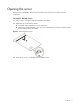
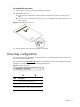
To reinstall the top cover:
1. Perform steps 1 through 4 of the post-installation procedure.
2. Reinstall the top cover.
a. Align the cover to the chassis and then slide it towards the front panel to position it into
place.
b. Once the cover is attached to the chassis, secure it by tightening the captive thumbscrew on
the rear panel.
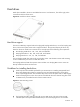
Figure 2 Reinstalling the top cover
3. Perform steps 6 and 7 of the post-installation procedure.
Drive bay configuration
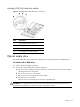
The server supports three drive bays—two drive bays for 1-inch hard disk drives and one drive bay
for a slim-type optical media drive.
Go to the HP website at www.hp.com
and refer to the options list for this server model for the latest
information on supported hard drives and optical media drives.
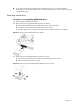
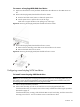
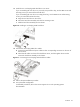
Figure 3 System drive bays
Item Description
1 1-inch hard disk drive bays (two)
2 Optical media device bay
NOTE: The HDD bays support both non-hot-plug and
hot-plug SATA drives, as well as hot-plug SAS drives.