
HP ProLiant DL140 Generation 3 Server Maintenance and Service Guide


Contents 31
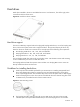
Opening the server
The top cover is detachable. Remove this cover before you can remove or replace a server
component.
To remove the top cover:
1. Perform steps 1 through 3 of the pre-installation procedure.
2. Detach the top cover from the chassis.
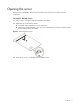
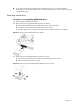
a. Loosen the captive thumbscrew on the rear panel.
b. Slide the cover approximately 1.25 cm (0.5 in) toward the rear of the unit, and then lift the
cover to detach it from the chassis.
Figure 1 Removing the top cover
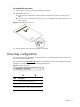
3. Place the top cover in a safe place for reinstallation later.