
SCSI Cable Installation Instructions for HP ProLiant DL100 Series Generation 2 Servers


f. Arrange the ATX CPU power cable, the ATX system board
power cable, and the I
2
C PSU cable over the routed SCSI
cable, then reconnect them to their corresponding system
board connectors.
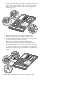
g. Route the SCSI and power cables through the cable
management opening of the chassis’ partition wall.
h. Connect the SCSI and power cables to their corresponding
connectors on the rear of the new drive.
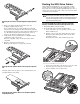
Make sure the terminated end of the SCSI cable is
positioned in the manner illustrated in the figure below.
i. Check that all cables are clear of the hard drive carrier and
are properly routed to their corresponding connectors, then
tighten the screw that secures the hard drive assembly to the
chassis.
3. Perform the post-installation procedures described earlier.