
ProLiant DL140 Generation 2 Server Maintenance and Service Guide

Diagnostic tools 49
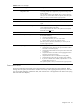
Table 5 POST error messages
Error code Error message Description/corrective action
0251 System CMOS checksum bad - Default
configuration used
The settings in the Setup Utility have been corrupted or modified
incorrectly, perhaps by an application program that changes data
stored in CMOS.
You can either load the system default values or access Setup and
enter your own custom values. If the error persists, check the system
battery or contact your HP Customer Support provider.
0260 System timer error * The timer test failed. Requires repair of the system board.
0270 Real time clock error * Real-Time Clock (RTC) fails BIOS hardware test. May require board
repair.
0271 Check date and time settings BIOS found date or time out of range and reset the RTC. May
require setting legal date (1991-2099).
Access Setup and check the values in the System Time and System
Date fields of the Main
menu.
02D0 System cache error - Cache disabled * RAM cache failed and BIOS disabled the cache.
Invalid System Configuration Data Problem with the CMOS data.
Do any of the following:
• Load the system default values.
• Access Setup and enter your own custom values.
• Clear the CMOS memory then restart the server.
If the error persists, check the system battery or contact your HP
Customer Support provider.
Operating system not found Operating system cannot be located on any of the boot drives.
• Verify that the priority boot drive has power and that its IDE or
SCSI cable is connected properly.
• Verify that the desired boot drive has power and its SCSI cable
is connected.
• Verify that the IDE or SCSI cable is securely plugged into their
respective system board connector.
• Verify that the boot device is enabled in the Setup Utility.
• Verify that the boot device has an operating system installed.
• If you have a diskette drive installed, verify that there is no non-
bootable floppy present in it.
If the problem persists, contact your HP Customer Support provider.
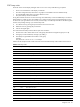
Terminal POST errors
There are several POST routines that issue a POST terminal error and shut down the system if they fail. Before
shutting down the system, the terminal-error handler issues a beep code signifying the test point error, writes the
error to port 80h, attempts to initialize the video, and writes the error in the upper left corner of the screen (using
both mono and color adapters).