
ProLiant DL140 Generation 2 Server Maintenance and Service Guide

Diagnostic tools 44
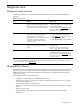
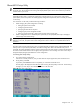
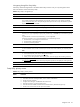
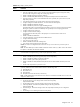
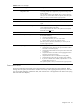
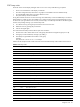
Table 4 Setup Utility's primary menus
Menu Function
Advanced Use this menu to:
• Clear all configuration data in a section of memory for ESCD (Extended System Configuration Data),
which stores the configuration settings for non-PnP plug-in devices.
• Enable or disable support for the legacy USB bus.
• Enable or disable RAID (Redundant Array of Inexpensive Disks) function for SATA devices.
• Select which LAN port will be used for IPMI-related functions. By default, the system uses the 10/100
Mbps LAN port (LAN1).
• View the MAC (Media Access Control) address of each of the three LAN ports.
• Configure settings for available PCI devices, as well as other PCI-related options.
• Enable or disable the USB host controller.
• Enable or disable the processor’s Hyper-Threading function.
Hyper-Threading (HT) is an Intel technology that enables a processor to execute two threads in parallel—
allowing the system to multi-task more effectively thus significantly boosts computing performance.
• Configure settings for the serial port.
• Configure console redirection settings.
Console redirection allows the system to be displayed on a remote terminal for online server
management.
• Enable or disable the DIMM slots.
• View the specification version for the IPMI and BMC firmware
• Configure LAN-related settings.
• View and/or clear the event log.
• Enable or disable the hardware watchdog timer.
• View real-time system temperature and voltage data.
Caution: Be cautious in setting field values in this menu as any incorrect value may cause the system to
malfunction.
Note: The SATA RAID option will be available in the future release of the PhoenixBIOS. Visit our HP website
for updates on the BIOS with this feature enabled.
Security Use this menu to safeguard and protect the system from unauthorized use by setting up access passwords. For
more information on using this menu, go to the “System passwords” section.
Power Use this menu to:
• Enable or disable the power-saving options (they are NOS dependent).
• Enable or disable the modem ring power-up function.
• Enable or disable system wake-up at a preset time.
• Enable or disable the WOL (Wake-On-LAN) function of the onboard LAN controllers (U127 and
U129)
• Set the mode of operation if a power loss occurs.
Boot Use this menu to set the preferred drive sequence in which the Setup Utility attempts to boot the operating
system. By default, the server searches for boot devices in the following order:
1 IDE CD-ROM drive
2 Removable device
3 Hard disk drive
4 PXE (Preboot Execution Environment, remote boot)
Note: A USB CD-ROM drive connected to the server will not be considered a bootable device. It will not be
displayed in the Boot
menu.
Exit Use this menu to select an exit option to quit from the Setup Utility. Options include:
• Exit Saving Changes - Saves changes made and close the Setup Utility.
Keyboard shortcut: F10
• Exit Discarding Changes - Discards changes made and close the Setup Utility.
• Load Setup Defaults - Loads the factory-default settings for all Setup parameters.
Keyboard shortcut: F9
• Discard Changes - Discards all changes made to the Setup Utility and loads previous configuration
settings.
• Save Changes - Saves all changes made to the Setup Utility.