
ProLiant DL140 Generation 2 Server Maintenance and Service Guide

Removal and replacement procedures 40
To replace the PSU:
1. Perform the pre-installation procedure.
2. Remove the default PSU.
Keep the three screws you removed in this step for installing the new PSU later.
a. Disconnect the processor power cable, the system board power cable, and the PSU I
2
C cable from the
system board (CN15, CN21, and CN18 respectively), then disconnect the power cables of all installed
drives from the PSU.
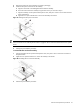
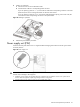
b. Remove the PSU mounting screw located between the PSU fans.
c. Remove the two PSU mounting screws located in the rear panel.
d. Lift the PSU away from the chassis.
Figure 56 Removing the PSU
3. Install the new PSU.
CAUTION: Do not over tighten the PSU’s screws to prevent them from breaking off. A maximum torque of
7 ± 1 is set for the system.
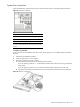
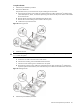
a. Position the new PSU in the PSU section of the chassis.
b. Insert the PSU mounting screw located between the PSU fans.
c. Insert the two PSU mounting screws located in the rear panel.
d. Reconnect the processor power cable, the system board power cable, and the PSU I
2
C cable to their
respective system board connectors, then reconnect the power cables of all installed drives to the PSU.
Figure 57 Installing the PSU
4. Perform the post-installation procedure.