
ProLiant DL140 Generation 2 Server Maintenance and Service Guide

Removal and replacement procedures 38
System fan connections
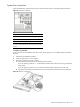
Figure 52 identifies the system fans by their device number and shows their corresponding cable connections.
Figure 52 System fan connections
Device number Connector
System fan 1 to 4 CN1 to CN4 on the front panel board
System fan 5 CN35 on the system board
System fan 6 CN37 on the system board
Note: System fans 1 to 5 are for the memory modules and
processors, while system fan 6 is for the PCI slots and system
chipsets.
To replace a system fan:
A new system fan can be installed to allow the server to operate properly in case a default system fan becomes
defective.
1. Perform the pre-installation procedure.
2. Locate the system fan you want to replace.
3. Remove the system fan you want to replace.
a. Disconnect the fan cable from its corresponding board connector.
If you are replacing system fan 1 – 4, release the fan cable from the cable clips securing it to the base
of the chassis.
If you are replacing system fan 5 or 6, pull the fan cable through the opening in the center wall
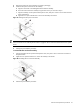
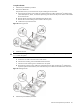
b. Tug the fan cable upward to release the fan from its bracket, then pull the fan away from the bracket.
Figure 53 Removing a system fan