
ProLiant DL140 Generation 2 Server Maintenance and Service Guide

Removal and replacement procedures 37
To replace the system battery:
1. Remove the PCI riser board assembly.
2. If necessary, remove any accessory boards or cables that prevent access to the battery socket.
3. Replace the battery.
IMPORTANT: Do not bend the spring latch during battery replacement. For proper operation, the latch must
maintain a position of contact with the battery.
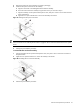
a. Insert a small flat-blade screwdriver or a similar tool between the battery and spring latch to dislodge
the battery from its socket.
b. Lift up the old battery to remove it.
c. Insert a new battery with the positive polarity (+ side) facing up, and ensure that it is seated completely.
Ensure the spring latch is in place, and that it holds the battery firmly.
Figure 50 Replacing the battery
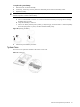
4. Perform the post-installation procedure.
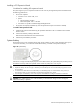
System fans
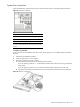
The server has six system fans located on the chassis’ center wall.
Figure 51 System fans