
ProLiant DL140 Generation 2 Server Maintenance and Service Guide

Removal and replacement procedures 31
Memory
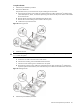
The system has eight DIMM slots that support up to 16 GB maximum system memory (2 GB in each of the eight
DIMM slots).
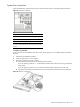
Figure 40 DIMM slots
Guidelines for installing memory modules
• Use only HP supported PC2-3200 (400 MHz) registered ECC DIMMs in 512 MB, 1 GB, or 2 GB
capacities
IMPORTANT: Use only HP supplied DIMMs. DIMMs from other sources can adversely affect data integrity.
• HP recommends installing memory modules in progressively larger capacity following the slot sequence
listed below:
• DIMMA1 and DIMMB1 – smallest capacity modules
• DIMMA2 and DIMMB2
• DIMMA3 and DIMMB3
• DIMMA4 and DIMMB4 – largest capacity modules
• Install memory modules in pairs of the same size following the population order illustrated in Table 1.
Table 1 DIMM population guidelines
DIMM slot label DIMM
configuration
DIMMA1 DIMMB1 DIMMA2 DIMMB2 DIMMA3 DIMMB3 DIMMA4 DIMMB4
2-DIMM
configuration
9 9
4-DIMM
configuration
9 9 9 9
6-DIMM
configuration
9 9 9 9 9 9
8-DIMM
configuration
9 9 9 9 9 9 9 9