
ProLiant DL140 Generation 2 Server Maintenance and Service Guide

Removal and replacement procedures 26
Configuring a SATA hard drive
Configuring a SATA hard drive is a two-step process that includes:
1. Install the SATA hard drive.
2. Set up the SATA configuration.
For detailed procedures, refer to the Server Support CD or to the operating system documentation.
To install a SATA hard drive:
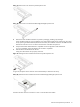
1. Install the SATA hard drive following the procedures described in the “To install a SCSI hard drive:”
section.
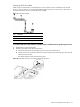
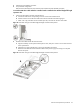
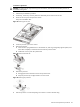
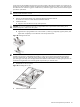
2. Route the SATA drive cables.
a. Route the SATA and power cables through the cable management opening of the chassis’ partition
wall.
b. Connect the SATA and power cables to their corresponding connectors on the rear of the new drive.
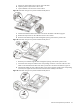
c. Check that all cables are clear of the hard drive carrier and are properly routed to their corresponding
connectors, then tighten the screw that secures the hard drive assembly to the chassis.
Figure 30 Routing the SATA drive cables
3. Perform the post-installation procedure.
4. Set up the SATA configuration.
For detailed procedures, refer to the Server Support CD or to the operating system documentation.