
ProLiant DL140 Generation 2 Server Maintenance and Service Guide

Removal and replacement procedures 22
Routing the SCSI drive cables
Cable routing for SCSI hard drive varies depending on which expansion slot you installed the SCSI controller
board—in the low-profile slot or in the standard height/full-length slot, and to a certain extent, to the location of
the cable connectors on the SCSI controller board you installed.
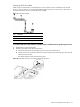
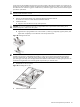
Figure 21 SCSI cable segments
Item Description
1 Connector end
2 240 mm location
3 Terminator end
To route the SCSI drive cables when the controller board is installed in the low-profile expansion slot:
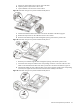
1. Reinstall the PCI riser board assembly.
2. Route the SCSI cable towards the SCSI hard drive.
a. Connect the cable to the corresponding connector on the SCSI controller board.
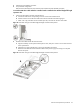
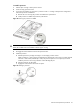
b. Fold the connector end of the SCSI cable in the manner illustrated in the following figure, then route the
cable towards the air duct.
The marked side of the cable should be facing down.
Figure 22 SCSI cable routing for low-profile controller boards phase 1