
ProLiant DL140 Generation 2 Server Maintenance and Service Guide

Removal and replacement procedures 20
Configuring a SCSI hard drive
The steps listed below give an overview of the SCSI hard drive configuration procedure.
1. Install the SCSI hard drive.
2. Install the SCSI controller board.
3. Route the SCSI drive cables.
4. Set up the SCSI configuration.
Refer to the documentation that came with the SCSI controller board for detailed procedures.
To install a SCSI hard drive:
1. Perform the pre-installation procedure.
2. Select which drive bay you will use to install the new hard drive.
If the desired drive bay is occupied, remove the currently installed drive.
If the desired drive bay is empty, perform step 3 of the “To remove a hard drive:” section, then remove four
mounting screws from the HDD carrier. You will use these screws to install the new drive.
3. Install the new SCSI hard drive in its carrier.
If you are installing the new drive in a previously occupied drive bay, use the HDD carrier and mounting
screws you removed from the old drive.
If you are installing the new drive in an empty drive bay, use the HDD carrier and mounting screws you
removed from that drive bay.
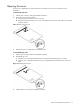
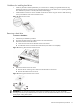
a. Align the new hard drive on the carrier.
b. Secure the hard drive assembly with the four mounting screws.
c. Slide the hard drive assembly into the chassis.
Figure 16 Installing a SCSI hard drive
Proceed to the next section for instructions on how to install the SCSI controller board.
To install the SCSI controller board:
The SCSI controller card can be installed in the low profile 64-bit/133 MHz PCI-X riser board slot or in the
standard height/full-length 64-bit/133 MHz PCI-X riser board slot.
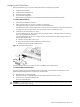
1. Remove the PCI riser board assembly.
2. Identify the slot that is compatible with the SCSI controller board you intend to install.
3. Pull out the slot cover from the selected slot.
Store it for reassembly later.
CAUTION: Do not discard the slot cover. If the expansion board is removed in the future, the slot cover must be
reinstalled to maintain proper cooling.