
ProLiant DL140 Generation 2 Server Maintenance and Service Guide

Removal and replacement procedures 17
Optical media drive
The optical media device bay supports the installation of a slim-type CD-ROM or DVD-ROM drive.
To install a CD or DVD drive:
1. Perform the pre-installation procedure.
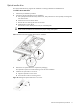
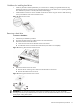
2. Prepare the optical media device bay for installation.
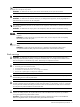
a. Pull up the optical media device bay release lever, then push the drive carrier partially out through the
front of the chassis.
b. Pull the drive carrier out of the chassis.
c. Remove the screw securing the drive carrier bezel.
d. Detach the drive carrier bezel.
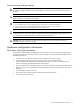
Store the drive carrier bezel (with its screw) for reassembly later.
CAUTION: Do not discard the drive carrier bezel. If the optical drive is removed in the future, this
bezel must be reinstalled in the chassis for the proper cooling of the system.
Figure 9 Preparing the optical media device bay for installation
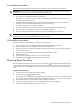
3. Remove the new optical drive from its protective packaging.
The optical drive option kits include mounting screws for drive installation.
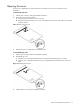
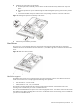
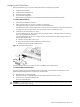
4. Install the new optical drive in its carrier.
a. Align the optical drive in the carrier.
b. Secure the drive with two mounting screws.
Figure 10 Installing the optical media drive in its carrier